You may recall, if you are a long time reader of the blog, that I used the Cricut Maker 3 back during the early days of COVID in 2020 to cut some oddly sized geometric shapes for quilting. If you’re new here, or if it’s just a case of so much time passing since then, you can check it my blog post about it here. The long and short of it was that I needed oddly sized squares for quarter square triangles, and the Cricut Maker 3 was the best tool I had to do it quickly and accurately.
I started a new quilt last month, which has been a challenge, to say the least. You see, it’s a diamond quilt, and I’ve been having some challenges getting it started. I found this beautiful fabric on fatquartershop.com, and immediately fell in love with it. This might come as a surprise to some readers, but I am a huge fan of all things patriotic. Every summer, I swear I won’t get roped into buying patriotic fabrics, but every summer … well, I’m wrong. We’ll leave it at that.
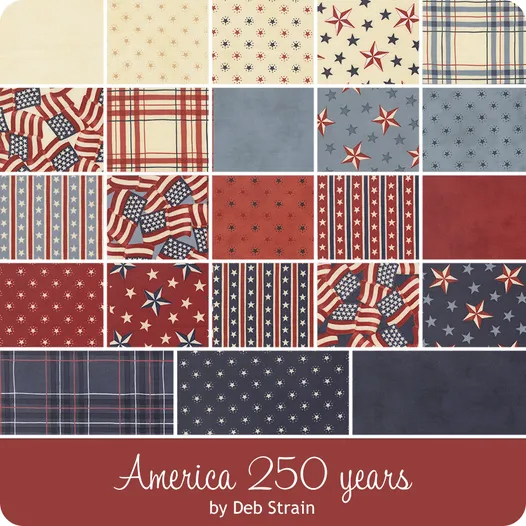
The colors in this fabric line are much deeper than most fabric lines, especially when it comes to the reds. And it’s done so well overall, I knew I couldn’t pass it up, so of course I caved and ending buying quite a bit of the fabric both online and at the local quilt shop. I knew I had to buy it pretty soon, because it’s one of those things that will sell out quickly, and I wasn’t wrong. I ended up having to source the fabric from about four different places, and I still didn’t end up with all of it. I did buy five mini charm packs to use in my quilt, so I will have all the fabrics represented at least five times, and in most cases, 10 times, thanks to duplicate prints.
The diamonds are paper pieced, so I need to cut at least some of the fabric into diamonds that are sightly larger than the paper diamonds I bought. With the mini charms, it was simple. A dot of glue to hold the template in place, and then I would basically cut off the corners, put a couple dabs of glue on the paper shape along each edge, and then fold the fabric over. But when I ran out of mini charm packs, I had to move to cutting up the yardage I bought.
My first instinct was to use my Brother Scan & Cut (SNC), because it is touted as a fabric cutting machine by the manufacturer. However, I ran into several problems trying to cut the diamonds on the SNC, so after a few attempts to fix the problem, I decided to try the Cricut Maker 3.
I haven’t been doing a lot of sewing recently, so I forgot all about using the Maker 3 back in 2020 to cut out the Little House on the Prairie quilt (which I have thrown over me as I type this). I’ve used it for other things since then, as well, such a mask making, other quilts, etc., but in the moment, I forgot all about it. I was desperate though, so I gave it a try, and it works so much better than the SNC for cutting fabric.
That doesn’t mean that I didn’t have problems with the Maker, though. Cricut has quite a selection of shapes in their library, and they had a 60 degree diamond, which was perfect for my needs. The SNC dimensions are by edge length for the diamonds, but Cricut uses total overall size, so I had to play with it a little bit to get it set up, but eventually, I did. The diamonds ended up being 2″ x 4.38″, which wraps around the paper diamonds perfectly. Cutting with the Maker is super easy, and in no time I had a pile of diamonds, ready to be prepped for piecing.
I will still use the SNC but for more specialized cutting. For example, if I need to cut several very small pieces and/or put them on different fabrics on the same mat, I’ll use the SNC. I can use it to scan in the fabrics that are on the mat and then move the shapes to the correct fabric. There are proprietary things in the Brother library that I like.
There are several reasons why I prefer the Maker 3 over the SNC for repetitive fabric cutting. First off, Cricut is very user friendly. I’m not a fan of Cricut Design Space, but I don’t find it ridiculously difficult to work with, and I’m able to get projects to the cutting stage faster than the Scan and Cut, as long as Design Space is up and working. I could do an entire post on Design Space alone, but for now, suffice to say that I don’t run a business, so I don’t have issues with Design Space frequently.
The rotary blade on the Cricut Maker 3 is worth the price of admission all by itself. It is MADE to cut fabric, and it does that very well. I truly think that Maker is better at cutting fabric than the SNC, and I think it’s down to the blade. The biggest issue I have with my SNC when cutting fabric is that if the blade is dull even a little bit, the fabric gets dragged along the mat instead of cut. The blade on the SNC basically shifts the fabric, because if it’s dull, there isn’t a mechanism to avoid the fabric being pulled off the mat. The rotary blade on the Maker doesn’t drag fabric because it rolls, which I think is the genius behind the Maker. I love the SNC for cutting small appliqué pieces, but you more or less need a fresh blade to do it. Blades aren’t terribly expensive; you can get them on Amazon.com for about $18 each. It’s getting the blades that are the problem, because there isn’t a wide distribution for these machines and their accessories.
The mats for the SNC are very expensive when compared to the Maker. Let’s take a look at the price of mats for each machine.
| Machine | Mat type | Michael’s* | Amazon |
| Cricut Maker 3 | Standard | $4.00 (sold in pack of two) | $3.33 (pack of 6 on Amazon, Cricut branded) |
| Cricut Maker 3 | Fabric | $5 (sold in pack of two) | $10 |
| Cricut Maker 3 | Light | $8.00 (sold in pack of one) | $3.33 (pack of 6 on Amazon, Cricut branded) |
| Brother Scan & Cut DX | Standard | No | $25.99 |
| Brother Scan & Cut DX | Fabric | No | $47.99 |
| Brother Scan & Cut DX | Light | No | $31.89 |
* Michael’s has a sale currently. The above are the reduced prices. If you order online, you get 50% off, and if you pick up in store, they have buy two get to free. Either way, the final cost is about the same if you buy two, get two free in store.
Despite my best efforts, I couldn’t find a local vendor for the SNC mats. You can usually find them where the machines are sold, which is usually quilt shops, but as you can see, they are very expensive, especially when compared to the Cricut mats. Granted, the Michael’s price is a sale price, but generally speaking, I can walk into my local Michael’s store and pick up a couple of mats for a reasonable price. That convenience is a huge selling point, in my opinion, because if you can take an hour out of your day to go pick up the mat you need, it doesn’t slow your progress nearly like having to wait for a mat being delivered in one to two days.
For me, the clear winner is Cricut, at least for this application. The cost of the mats alone make the Cricut the better choice. We haven’t even touched on the price of the machine itself, but Cricut also wins there, coming in at around $400 for the new Maker 4, while the Brother Scan & Cut runs around $900 for something comparable. You can get the less expensive $300 SNC but I’m not sure how well it cuts; I’ve never had one of those so I can’t speak to it’s performance. I’ll be using the Cricut for bulk fabric cutting going forward, and the SNC for applique pieces that are cut one at a time.
Do you use a cutting machine? If so, which one? I’d love to hear your thoughts about them!
 Texas Quilt Girl